An engine is EPA's command-line runner, runswmm.exe on
Windows or runswmm elsewhere, found on disk as §1.2 describes. Each is identified by the
version it reports to --version and by the SHA-256 of the
executable file, and both are stamped into every run. The Run menu lists
them as EPA SWMM 5.2.4 — 32-bit (x86); the SWMM panel adds
runs out-of-process when the architecture differs from
StormSewer's.
Several may be registered — 5.1.015 beside 5.2.4, or a 64-bit build
you compiled beside EPA's 32-bit one — and the chosen engine is the one
F5 uses. Find Engines (Run menu and panel)
rescans. The choice persists for the session.
StormSewer never modifies an engine, links to it, or patches its results. What EPA ships is what runs.
Run (F5, the toolbar button, Run → Run,
or Run Model in the panel) does, in order:
%TEMP%\StormSewer\run\<hash>\, with the model's
[FILES] and data files carried along so their relative
paths still resolve, and that copy runs. The report and results land
beside whichever file ran, and the Run Status window says which
(Model read, Ran a scratch copy)..rpt and .out beside it,
because runswmm appends to an existing report and a run
that dies without writing could otherwise be mistaken for a
success.inp rpt out
as arguments and waits. The window stays responsive; the toolbar shows a
spinner and the panel says running…. Nothing else in the
app runs in the background.runswmm exits 0 whether the run
worked or not, so the exit code is recorded for the log and ignored for
the verdict. A run succeeded when the report has no
ERROR line and a non-empty .out exists..out metadata (periods, step, object counts,
flow units, start date) and computes the peaks for the map.%TEMP%\StormSewer\runs\<n>\
for Compare Runs; the last ten are kept.Stop is in the Run menu but the engine runs to
completion in this build
(The engine runs to completion; it cannot be interrupted yet).
The Run menu also holds Check Model… (the QA pass on demand — the findings grouped as Errors — the engine will refuse or misread the model and Warnings — the model runs, but check these, each clickable to select the object) and Autosave every N min (0 = off; §1.6).
Under the Project/Layers tabs:
No SWMM engine found. in red; Find
Engines.ERROR (red) and WARNING (grey) line from
the report, worst continuity ±x.xxx% (section), and the
failure reason if it failed; Run ALR Checks when the
run succeeded.n periods every s s, node
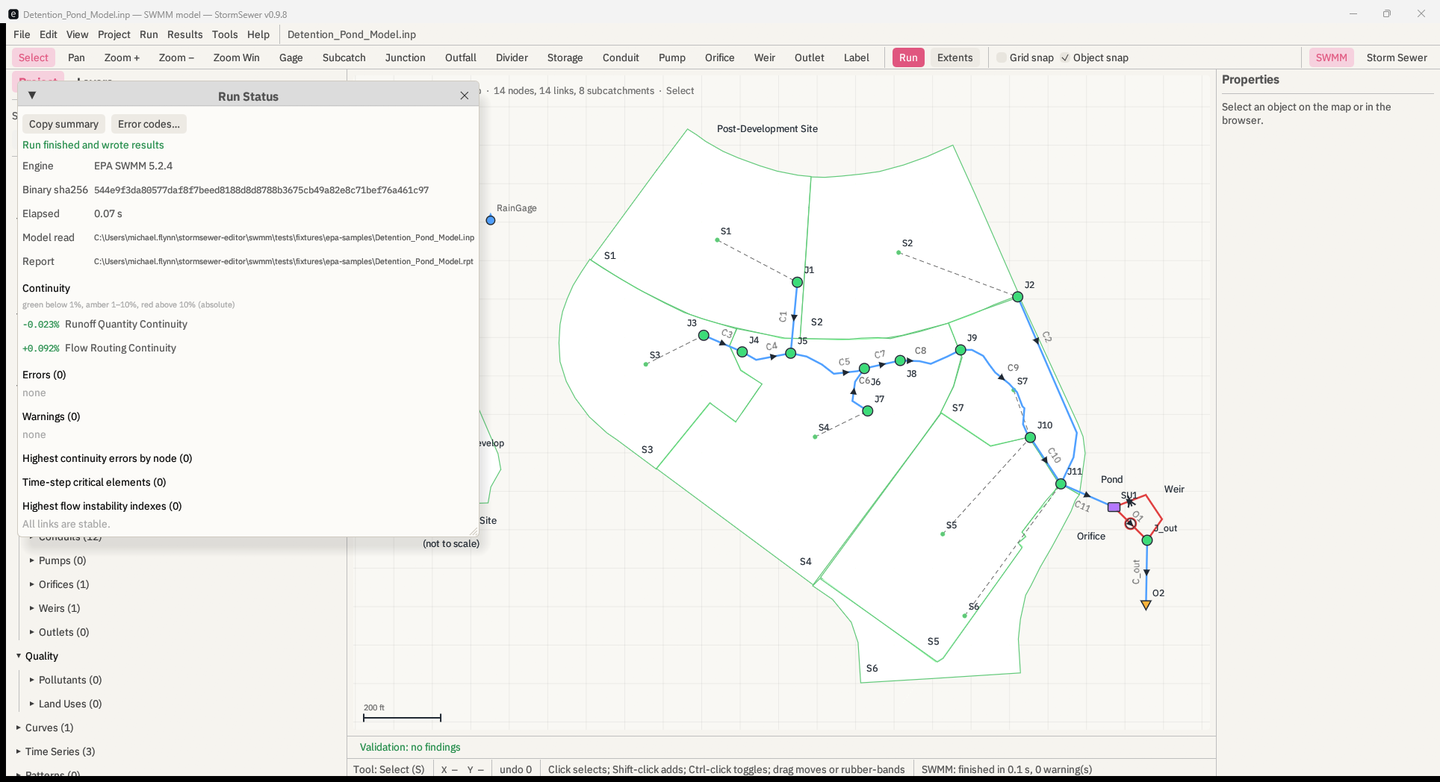
and link counts with the flow units, the start date.When a run finishes, Results → Run Status… opens by itself with the whole story of the run in one window:
EPA SWMM 5.2.4 and
Binary sha256, the SHA-256 of the runswmm
executable that produced this run; Elapsed;
Model read — the path the engine read, with
Ran a scratch copy when the model was dirty or on a
non-ASCII path.Run finished and wrote results, or
Run failed: … with the first fatal line.No continuity section: the run did not get that far. when
the engine stopped in input.WARNING nn and ERROR nnn line, each with what
the code means, the usual cause and the fix from the built-in index, and
the object it names (if any) selected on click. Error
codes… opens the index.Help → SWMM Error Codes… lists the whole index — 112 codes from the EPA SWMM 5.2 User's Manual, with causes and fixes drawn from what the forum threads show people needed — with a Search box. Appendix C.
The report (.rpt) is the only place the engine says
whether the run was any good. StormSewer parses:
EPA STORM WATER MANAGEMENT MODEL - VERSION 5.2 (Build 5.2.4))
for the version;ERROR nnn: line (fatal) and
WARNING nn: line;Continuity Error (%) line with the section it
sits in (Runoff Quantity Continuity,
Flow Routing Continuity,
Quality Routing Continuity,
Groundwater Continuity);worst continuity is the largest absolute value across
the sections. What the number means and what to do about it is §16.1.
Tools → ALR Checks (or Run ALR Checks) runs the ALR
post-processor on a finished run. ALR is a separate Python package that
reads the .out and the .inp beside it and
evaluates conditions the engine's own report does not. StormSewer finds
it through STORMSEWER_ALR_SCRIPT (the path to
run_headless_swmm.py) and
STORMSEWER_ALR_PYTHON (the interpreter, when it is not
python), runs
python run_headless_swmm.py <model.out> --json, and
shows the verdict: a one-line summary and each failed check with its
node and message. Without those variables the item does nothing useful.
The .inp must be beside the .out, which a
StormSewer run guarantees.
The same engine registry, report parser and result reader are in
stormsewer-swmm, a command-line tool built with the
app:
stormsewer-swmm engines
stormsewer-swmm run <model.inp> [--engine <id>] [--alr]
stormsewer-swmm info <model.out>
stormsewer-swmm series <model.out> (--node <name> | --link <name>) [--var <variable>]
stormsewer-swmm report <model.rpt>
stormsewer-swmm alr <model.out> [--nodes a,b] [--top N] [--all]
stormsewer-swmm inp <model.inp>
Unlike runswmm, it exits non-zero when a run fails, so
it can drive a batch. inp parses a model losslessly, proves
the round trip, lists its sections and prints the validator's findings.
Node variables are
depth head volume lateral-inflow total-inflow flooding;
link variables flow depth velocity volume capacity.
[FILES] lines are written as text
in the Options dialog and the engine does the rest.THREADS is an engine option and is
passed through.