StormSewer is a desktop editor for EPA SWMM 5 models. It opens an
.inp file, draws it, lets you edit it on the map and in
tables, runs it on the EPA engine installed on your machine, and shows
the results on the same map. It also contains a storm-sewer design tool
(Rational method, Manning, HGL backwater, HEC-22 inlets, auto-sizing)
that can run on the conduits of a SWMM model or on its own network.
Three things about it are worth knowing before anything else:
runswmm.exe (or runswmm
on macOS and Linux) as a child process and reads the .rpt
and .out files it writes. Every run is stamped with the
engine's version and the SHA-256 of the executable..inp it did not change: comments, blank lines, column
spacing, sections it has no editor for. Saving a model you only looked
at writes the identical file.Ctrl+Z.| Platform | Get it |
|---|---|
| Windows | StormSewer-x.y.z-setup.exe (installer) or
StormSewer-windows-x64.zip (portable, no administrator)
from the Releases page.
Also winget install MichaelFlynn.StormSewer or
scoop bucket add stormsewer https://github.com/mf4633/scoop-bucket && scoop install stormsewer. |
| macOS | StormSewer-macos-universal.zip, or
brew tap mf4633/tap && brew install --cask mf4633/tap/stormsewer. |
| Linux | StormSewer-x86_64.AppImage (chmod +x, run)
or StormSewer-linux-x64.tar.gz. |
| From source | Install Rust, then
git clone https://github.com/mf4633/stormsewer && cd stormsewer && cargo build --release.
The app is target/release/StormSewer. |
The Windows and macOS builds are not code-signed. SmartScreen and Gatekeeper warn on first launch; on macOS right-click the app and choose Open.
StormSewer needs a graphics driver (Direct3D 12 or OpenGL 2.0 or
later). The Windows installer bundles a software renderer (Mesa
llvmpipe) that is used only when no hardware backend starts, so remote
desktops and virtual machines work.
StormSewer --check-renderer starts, draws one frame, exits,
and says which renderer worked.
Install EPA SWMM 5.2 from the EPA website. StormSewer looks for a runner in:
STORMSEWER_SWMM_ENGINE_DIR
environment variable;Program Files,
Program Files (x86) and ProgramW6432 whose
name starts with EPA SWMM or SWMM;PATH.Several engines can be registered at once (5.1.015 beside 5.2.4, say)
and you choose per run in the Run menu. Run → Find Engines rescans. The
Run menu shows each engine as
EPA SWMM 5.2.4 — 32-bit (x86); EPA's stock Windows build is
32-bit, which is one reason the engine runs out of process rather than
as a library.
If no engine is found the Run menu says
No SWMM engine found and the Run button is refused with
No SWMM engine: choose one in the Run menu. You can still
open, edit and save models without one.
Tools → Python Terminal… needs a python (Windows) or
python3 (elsewhere) on PATH. Nothing else is
installed; the kernel script is compiled into the app. See chapter 18.
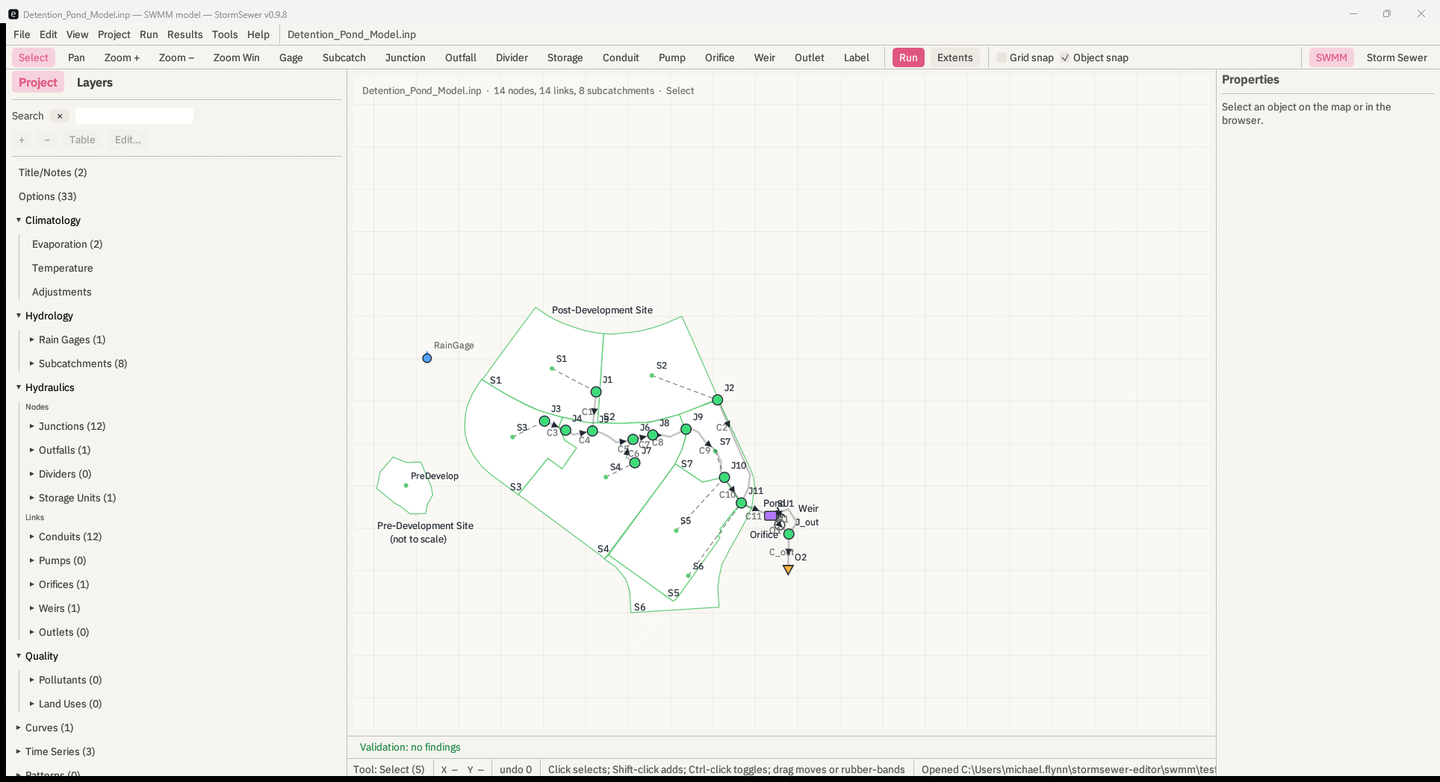
The dataset is docs/datasets/Detention_Pond_Model.inp,
the EPA sample model (public domain). It has 8 subcatchments, 12
junctions, a storage unit SU1 with an orifice
O1 and a weir W1, an outfall O2,
and a 12-hour kinematic-wave run.
.inp: File → Open .inp…, drag the file onto the window, or
start the app with the file as its argument
(StormSewer Detention_Pond_Model.inp). Any of these
switches to the SWMM workspace.Detention_Pond_Model.inp · 14 nodes, 14 links, 8 subcatchments · Select.
The line under the map reads Validation: no findings.J1.
The Properties sheet on the right fills with its
[JUNCTIONS] row: Elevation 4973, MaxDepth 0, and so on.
Click subcatchment S1; the sheet shows its
[SUBCATCHMENTS] row and its [SUBAREAS] and
[INFILTRATION] rows under it.J1's
Elevation to 4974 and press Enter. The Edit menu now reads
Undo Set Elevation of J1. Press Ctrl+Z; the
value returns to 4973 and the file text is byte-for-byte what it
was.F5, or the red Run button
on the toolbar. The left panel shows a spinner and
running…. The pond model takes about a second. When it
finishes the Run Status window opens by itself: the
engine (EPA SWMM 5.2.4) and its binary hash, the elapsed
time, the continuity errors coloured green/amber/red, every warning with
what it means, and the report's diagnostic lists in full. The left
panel's Last run block keeps the short form:
worst continuity +0.092% (Flow Routing Continuity). If you
had not saved the model, the run used a scratch copy under
%TEMP%\StormSewer\run\, and the window says so
(Ran a scratch copy); the .rpt and
.out are beside that copy.J1, then
Shift-click J_out. Choose View → Profile from Selection.
The long-section shows ground, inverts, crowns, the HGL at the slider's
instant and, with Max HGL ticked, the envelope of the
run's maximum head at every node.Ctrl+Z until the
Edit menu says Undo with no label. Then File → Save. The
saved file is identical to the one you opened.That is the whole loop: open, edit, run, look, undo, save.
Top to bottom, left to right: the title bar names the file, the workspace and the version; the menu bar (File, Edit, View, Project, Run, Results, Tools, Help); the toolbar; the left panel; the map; the Properties sheet; the status bar.
From left to right: the seventeen map tools — Select, Pan,
Zoom +, Zoom −, Zoom Win, Gage, Subcatch, Junction, Outfall, Divider,
Storage, Conduit, Pump, Orifice, Weir, Outlet, Label — then
Run and Extents, then the Grid
snap checkbox (with its spacing when on) and Object
snap. At the right end, SWMM / Storm
Sewer switches workspaces, ● Unsaved appears when
the model is dirty, and a spinner turns while the engine runs. Hover a
tool for its full name and shortcut key.
Two tabs, Project and Layers, over the SWMM run panel.
+ and
− add and delete objects; Table opens the
kind's attribute table; Edit… opens its dialog. Chapter 4.The header line above the map names the file, the object counts and
the active tool. Below the map, Validation: … summarises
the live referential checks; click it to list the findings, and click a
finding to select its object. The status bar shows the tool, the
pointer's model coordinates, the undo depth, the tool's hint, and the
last file message. Chapter 3.
The right-hand sheet edits the selection. View → Properties hides and shows it. Chapter 5.
File → Storm Sewer Design Workspace (also in View and Tools, and the Storm Sewer button on the toolbar) returns to the design workspace; the SWMM model stays open. View → SWMM Model Editor comes back. The two workspaces have separate documents; Tools → Storm Sewer Design runs the design engine on the SWMM model (chapter 12), and File → Import/Export move a network between them (chapter 13).
Every change to the model goes through one command history:
Set <field> of <name>.Ctrl+Z undoes, Ctrl+Y or
Ctrl+Shift+Z redoes. The Edit menu names the step
(Undo Add junction J13), and the status bar's
undo N shows the depth. History holds the last 500 steps.
Undo restores the file text exactly, including the original spacing of a
row the edit had rewritten.
Two things are not undo steps because they do not change the model: view changes (zoom, layers, which pane is open) and running the engine.
Ctrl+S saves to the model's own path;
Ctrl+Shift+S or File → Save As… asks for a new one. New and
Open on a dirty model raise an Unsaved SWMM model
dialog with Save model…, Discard changes and Keep
editing; closing the app asks the same question. File → Recent
Models keeps the last eight.
Autosave. While the model is dirty, its text is
written every few minutes — the interval is Autosave every N
min in the Run menu, default 2, 0 to turn it off — to
<model>.inp.autosave beside the file, or under
%APPDATA%\StormSewer\recovery for a model that has no file
yet. Saving or closing the model removes the snapshot. Opening a file
that has a newer snapshot beside it asks Recover unsaved
changes? with both timestamps: Restore autosave or
Discard it, keep the file. The snapshot never touches the
.inp itself.
The document is lossless in this sense: parsing a file and writing it back produces the identical bytes, for every file the tests have seen. Kept in place are
;; rulers and ;
remarks) and every trailing ; comment on a data line;[OPTIONS];[LID_CONTROLS], [STREETS], anything a later
SWMM adds);[Polygons] beside
[COORDINATES]);The one thing that is not preserved is the exact padding of a row
after you edit it: the row is rewritten whitespace-delimited,
padded to the column widths of the section's own ;;----
ruler, with the section's separator (tab if the ruler uses tabs). The
values are exact; the spacing is regenerated. Unedited rows never
change.
This is checked in swmm/tests/doc_roundtrip.rs against
the seven EPA sample models, byte for byte, and by undoing random edit
sequences back to the original text.
| What | Where |
|---|---|
| Preferences (theme, snap, layer settings) | %APPDATA%\StormSewer\app_prefs.json (Windows),
~/Library/Application Support/StormSewer (macOS),
$XDG_CONFIG_HOME/stormsewer or
~/.config/stormsewer (Linux) |
| Recent SWMM models | recent-inp.json in the same folder |
| A run of an unsaved model, or of a model on a non-ASCII path | a scratch copy under
%TEMP%\StormSewer\run\<hash>\ with its
.rpt and .out and any [FILES]
data files carried along |
| Autosave snapshot of a dirty model | <model>.inp.autosave beside it, or
%APPDATA%\StormSewer\recovery\ for a model with no
file |
| Run history for Compare Runs | %TEMP%\StormSewer\runs\<n>\ — the last ten
runs |
| The Python kernel script | %TEMP%\stormsewer-pykernel-<hash>.py |
A run of a saved, clean model writes its .rpt and
.out beside the .inp, which is EPA's own
convention.